What Every Etsy Seller Should Know About Tablet Etsy Listings Mockups
If you sell digital art, printable wall decor, or tablet cases on Etsy, you have already seen shops using tablet mockups that look incredibly polished. The device screen blends perfectly with the background, the shadows feel natural, and the overall presentation makes you want to click "Add to Cart."
You know that a strong listing image directly affects click-through rates and conversions. A tablet mockup is one of the most effective ways to show scale, demonstrate your design, and build a professional brand identity—all without needing to photograph a physical device yourself. It bridges the gap between a flat digital file and a tangible product that a buyer can imagine owning.
But here is the catch: using a tablet mockup incorrectly can undermine your credibility. Over the years, I have reviewed hundreds of Etsy listings, and a few recurring mistakes consistently make shops look less trustworthy than they actually are. Let us walk through the most common pitfalls and, more importantly, how to avoid them so your shop reflects the quality of your work.
Mockup and Product Mismatch
One of the most frequent errors is a mismatch between the device in the mockup and the actual product you are selling. Someone selling a Samsung Galaxy Tab case uses an iPad Air mockup. Or a seller offering a universal tablet sleeve places the design on a Microsoft Surface Pro.
This might seem like a small detail, but buyers notice. If the bezels, button placement, or camera cutout do not match, it signals that you may not be paying close attention to your product. That perception erodes trust before the customer even reads your description.
My advice is straightforward. If you sell specific device cases, use a mockup that matches that exact device line as closely as possible. If you sell generic sleeves or universal holders, choose a neutral tablet mockup that does not highlight specific buttons or bezels. Keeping the focus on your design without misleading the buyer is always the better approach.
Realistic Lighting and Shadows Matter More Than You Think
A flat, hard shadow or an inconsistent light source immediately screams "template." Etsy shoppers are savvy. They have scrolled past thousands of product images. A mockup with harsh, unrealistic shadows can cheapen the perception of your entire shop, even if your artwork is outstanding.
The fix is simpler than you may expect. When choosing a tablet mockup, look closely at the shadow quality. Is it soft or hard? Does the light direction match the mood of your brand? If you sell cozy, warm art prints, a mockup with soft, warm lighting will complement your work far better than a sterile, high-contrast office scene.
Also, pay close attention to the smart object layer in your editing software. When inserting your design, ensure it aligns perfectly with the screen guidelines. Do not stretch or squash your artwork. Zoom in and check the edges. A pixel-perfect fit makes the difference between a mockup that looks genuinely real and one that looks pasted on.
Designing for the Search Feed, Not Just the Full View
This is the mistake that silently hurts sales the most. You create a beautiful, wide landscape mockup. It looks stunning on your computer screen. But in Etsy’s search results, it gets cropped into a small square. Your carefully placed title text is cut off, or the focal point of your art disappears entirely.
Always design with the square crop in mind. Etsy’s search grid is primarily square. Preview your mockup as a square thumbnail before finalizing it. Place your most important visual elements within the center-safe zone of the image.
- Use a tablet mockup that includes negative space around the device.
- Add subtle text overlays in the center, not the edges.
- Check how the thumbnail looks at a small size, around 150 pixels wide.
- Avoid putting critical design elements in the outer 15% of the frame.
Thinking about what the customer sees first when scrolling through hundreds of options will dramatically improve your click-through rate.
Context Matters: Moving Beyond the Isolated Device
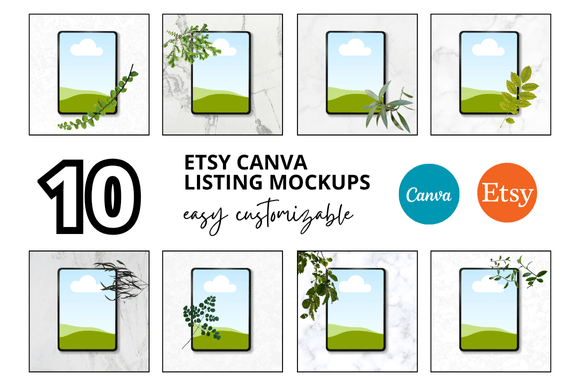
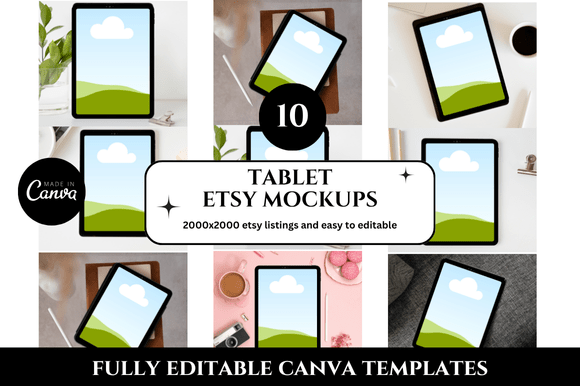
An isolated tablet floating against a white background is safe, but it lacks personality. It does not tell a story. Shoppers buy based on emotion and the vision of using your product in their own life. This is where a lifestyle tablet mockup can make a real difference.
Placing the tablet on a wooden desk, next to a warm cup of coffee, or held in someone’s hand creates a narrative. It helps the buyer visualize your art on their wall or your case in their daily routine. You do not need a professional photoshoot to achieve this effect.
Many high-quality mockup templates include layered, editable scenes. You can swap backgrounds, adjust props, and change colors to fit your brand. The key is relevance. If you sell boho wall art, a minimalist desk scene with a plant is perfect. If you sell tech gadgets, a clean, modern workspace works better. Match the context to your ideal customer.
Licensing Landmines and Commercial Use
Licensing is not the most exciting part of design, but ignoring it can create real problems. Many free mockups are strictly for personal use. Using one on your commercial Etsy listing is a direct violation of the creator’s terms. You could receive a takedown notice or worse.
How do you protect yourself? First, always check the license file included in your download. Look for language that explicitly allows commercial use. Second, stick to reputable platforms known for clear licensing.
- Creative Market and Yellow Images clearly label commercial licenses.
- Design Cuts offers bundles with straightforward terms.
- Many mockup sellers on Etsy itself provide commercial use, but read the description carefully.
Spending a few dollars on a properly licensed mockup is an investment in your business’s safety and professionalism. A twelve-dollar mockup set that includes five different angles is far cheaper than dealing with a copyright claim later.
Resolution, File Size, and Workflow Efficiency
There is a sweet spot for image resolution. Too low, and your listing looks pixelated and unprofessional. Too high, and you are stuck with a 100MB PSD file that crashes your editing software or slows down your entire workflow.
Etsy recommends images be at least 2000 pixels on the shortest side. For a tablet mockup, aiming for 3000 pixels on the longest side provides excellent clarity for zooming without creating unnecessary bloat. This balance keeps your files manageable while maintaining sharpness.
When exporting your final image, save it as a high-quality JPG. A quality setting between 8 and 10 usually works well. Keep the file size under 5 megabytes if possible. Fast loading times improve the shopping experience and are a factor in how Etsy ranks search results. A slow page hurts everyone.
Practical Checks Before You Publish
Before you hit publish on your next listing, run through a short checklist. This takes only a few minutes and can prevent the most common issues.
- Does the device in the mockup match the product you are selling?
- Is the lighting consistent with your brand’s overall aesthetic?
- Does the thumbnail crop cut off any important text or visual elements?
- Does the scene provide helpful context without being distracting?
- Do you have the proper commercial license for this mockup file?
- Is the exported image sharp but reasonably sized for fast loading?
Taking the time to audit your current listings with these questions in mind will reveal opportunities for improvement you may have missed.
Your Designs Deserve a Premium Presentation
Using a tablet mockup for your Etsy listings is a smart, efficient choice. It saves you the hassle of product photography, ensures brand consistency, and allows you to showcase your designs in a realistic context. But the specific choices you make—from the device itself to the lighting, the crop, and the licensing—determine whether that mockup elevates your shop or holds it back.
Take a few minutes today to look at your current listing images with fresh eyes. Does the tablet mockup look genuinely realistic? Does it match the product you are offering? Is it optimized for how customers will actually see it in search results?
Your work deserves a presentation that captures its true value. With the right approach to tablet mockups, you can build a shop that looks as premium as the designs you create, helping you connect with the right customers and grow your business with confidence.